KML文件格式讲解
KML文件的定义及其在GOOGLE地图浏览器中的地位
基于文件的数据交换很早以来就是软件数据交换的主要方式之一。而KML文件就是一种在GOOGLE地图浏览器中用于交换地理数据的文件。它基于XML,并定义了一些TAG用于规定地理数据的显示方式。KML可用于定义的地理特征包括地点、描述、叠层、路径和多边形等。KML的用途主要有:
- 指定地点的图标和注记;
- 为每一个地理特征创建不同的视角位置;
- 在地球上叠放图像;
- 指定地理特征显示的样式;
- 编写地理特征的HTML描述,包括超链接和内嵌图像;
- 使用文件夹对地理特征进行群组;
- KML文件的动态获取及修改;
- 显示三维地物;
基本格式
基本格式的KML文件是指可以直接由Google Earth创建的KML文件,它包括地点标记、叠层、路线和多边形。下面分别介绍。
地点标记(Placemarks)
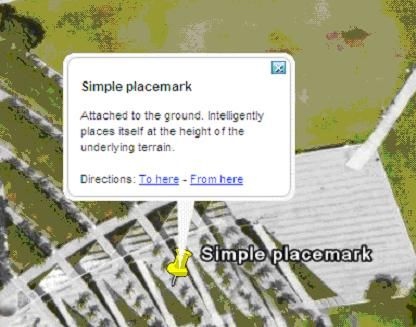
地点标记是Google Earth中最常用的地理特征,它使用一个黄色的图钉在地球表面标记一个位置。一个简单的地点标记的KML代码如下所示:
<?xml version="1.0" encoding="UTF-8"?>
<kml xmlns="http://earth.google.com/kml/2.1">
    <Placemark>
        <name>Simple placemark</name>
            <description>Attached to the ground. Intelligently places itself
       at the height of the underlying terrain.
            </description>
        <Point>     <coordinates>-122.0822035425683,37.42228990140251,0</coordinates>
</Point>
</Placemark>
</kml>
它包括以下几个部分:
- XML头:<?xml version="1.0" encoding="UTF-8"?>
- KML命名空间定义:
- 地点标记对象,包括:
名称(name):用于对地点标记进行注记;
描述(description):对地点标记进行描述,“气球(ballon)”中的显示内容;
点(Point):指定地点标记的位置。
使用HTML描述地点标记
有两种方式来使用HTML描述地点标记,一种是直接在
<?xml version="1.0" encoding="UTF-8"?>
    <kml xmlns="http://earth.google.com/kml/2.1">
    <Document>
    <Placemark>
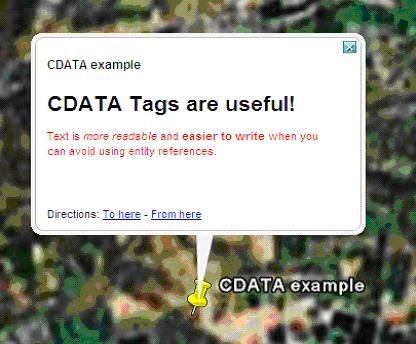
      <name>CDATA example</name>
      <description>
        <![CDATA[
          <h1>CDATA Tags are useful!</h1>
          <p><font color="red">Text is <i>more readable</i> and
          <b>easier to write</b> when you can avoid using entity
          references.</font></p>
        ]]>
      </description>
      <Point>
        <coordinates>102.595626,14.996729</coordinates>
      </Point>
    </Placemark>
 </Document>
</kml>
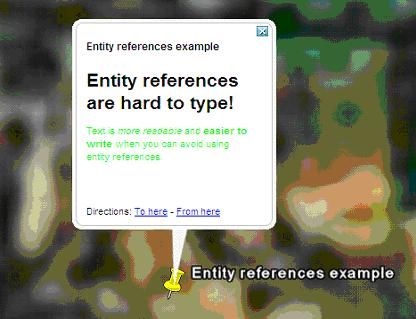
当然,还有一种使用转义字符来表示特殊符号的方式,这就不需要CDATA元素,如下所示:
<?xml version="1.0" encoding="UTF-8"?>
<kml xmlns="http://earth.google.com/kml/2.1">
<Document>
<Placemark>
<name>Entity references example</name>
<description>
<h1>Entity references are hard to type!</h1>
<p><font color="green">Text is
<i>more readable</i>
and <b>easier to write</b>
when you can avoid using entity references.</font></p>
</description>
<Point>
<coordinates>102.594411,14.998518</coordinates>
</Point>
</Placemark>
</Document>
</kml>
叠层
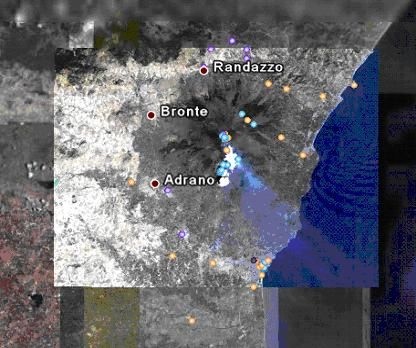
叠层是覆盖在地球表面的图像。一个简单的叠层KML代码如下所示:
<?xml version="1.0" encoding="UTF-8"?>
<kml xmlns="http://earth.google.com/kml/2.1">
<Folder>
<name>Ground Overlays</name>
<description>Examples of ground overlays</description>
<GroundOverlay>
<name>Large-scale overlay on terrain</name>
<description>Overlay shows Mount Etna erupting on July 13th, 2001.</description>
<Icon>
<href>http://code.google.com/apis/kml/documentation/etna.jpg</href>
</Icon>
<LatLonBox>
<north>37.91904192681665</north>
<south>37.46543388598137</south>
<east>15.35832653742206</east>
<west>14.60128369746704</west>
<rotation>-0.1556640799496235</rotation>
</LatLonBox>
</GroundOverlay>
</Folder>
</kml>
在 GroundOverlay 中,它包含两个较新的标记:
Icon:指定图片的URL;
LatLonBox:指定图片的位置和范围。
Google Earth支持JPEG,BMP, GIF, TIFF, TGA和PNG等格式的图像。
路线
在KML里面,路线由
<?xml version="1.0" encoding="UTF-8"?>
<kml xmlns="http://earth.google.com/kml/2.1">
<Document>
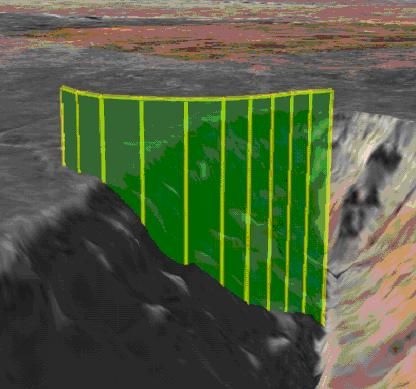
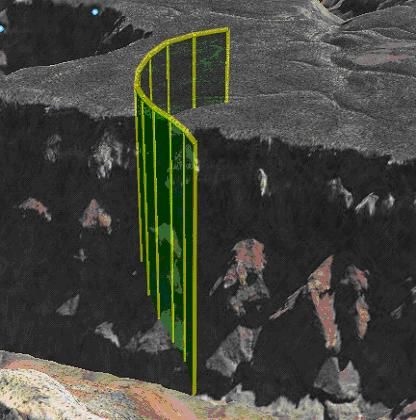
<name>Paths</name>
<description>Examples of paths. Note that the tessellate tag is by default      set to 0. If you want to create tessellated lines, they must be authored      (or edited) directly in KML.</description>
<Style id="yellowLineGreenPoly">
<LineStyle>
<color>7f00ffff</color>
<width>4</width>
</LineStyle>
<PolyStyle>
<color>7f00ff00</color>
</PolyStyle>
</Style>
<Placemark>
<name>Absolute Extruded</name>
<description>Transparent green wall with yellow outlines</description>      <styleUrl>#yellowLineGreenPoly</styleUrl>
<LineString>
<extrude>1</extrude>
<tessellate>1</tessellate>
<altitudeMode>absolute</altitudeMode>
<coordinates>
-112.2550785337791,36.07954952145647,2357
-112.2549277039738,36.08117083492122,2357
-112.2552505069063,36.08260761307279,2357
-112.2564540158376,36.08395660588506,2357
-112.2580238976449,36.08511401044813,2357
-112.2595218489022,36.08584355239394,2357
-112.2608216347552,36.08612634548589,2357
-112.262073428656,36.08626019085147,2357
-112.2633204928495,36.08621519860091,2357
-112.2644963846444,36.08627897945274,2357
-112.2656969554589,36.08649599090644,2357
</coordinates>
</LineString>
</Placemark>
</Document>
</kml>
多边形
多边形由
<?xml version="1.0" encoding="UTF-8"?>
<kml xmlns="http://earth.google.com/kml/2.1">
<Placemark>
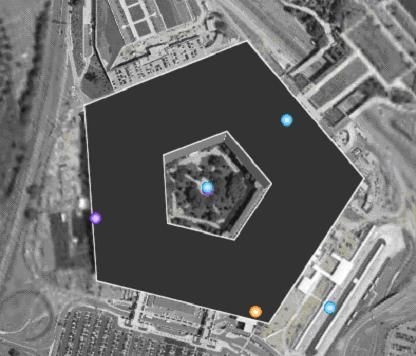
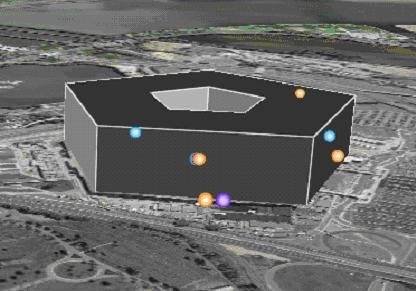
<name>The Pentagon</name>
<Polygon>
<extrude>1</extrude>
<altitudeMode>relativeToGround</altitudeMode>
<outerBoundaryIs>
<LinearRing>
<coordinates>
-77.05788457660967,38.87253259892824,100
-77.05465973756702,38.87291016281703,100
-77.05315536854791,38.87053267794386,100
-77.05552622493516,38.868757801256,100
-77.05844056290393,38.86996206506943,100
-77.05788457660967,38.87253259892824,100
</coordinates>
</LinearRing>
</outerBoundaryIs>
<innerBoundaryIs>
<LinearRing>
<coordinates>
-77.05668055019126,38.87154239798456,100
-77.05542625960818,38.87167890344077,100
-77.05485125901024,38.87076535397792,100
-77.05577677433152,38.87008686581446,100
-77.05691162017543,38.87054446963351,100
-77.05668055019126,38.87154239798456,100
</coordinates>
</LinearRing>
</innerBoundaryIs>
</Polygon>
</Placemark>
</kml>
> KML例子